Progress
🔥 Free Preview
Rive Basics - Animate
Create the Main Screen
Dynamic Weather Buddy
⚡️ Custom Events
🔗 Data Binding Basics
📝 Data Binding Basics - Exrc
🔗 Data Binding Advanced
🔗 Data Binding Expert | Main Project
👑 Data Binding Master
☀️ Weather Animation - Clear Skies
🌡️ Weather Animation - Heatwave
☔️ Weather Animation - Rainy
❄️ Weather Animation - Snowy (Exrc)
In the next lesson, we’ll start working with Listeners.
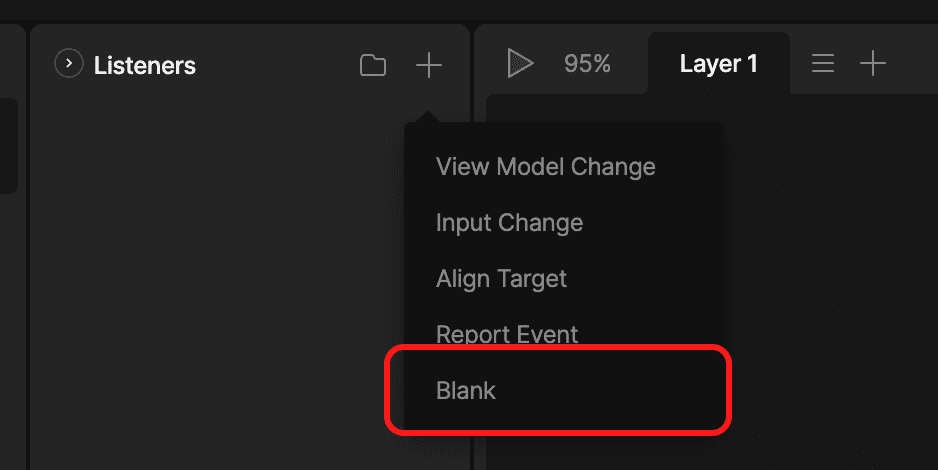
Since this lesson was recorded, the Listener creation UI in Rive has been updated.
When adding a new Listener, you are now asked to choose a preset action right away, instead of creating an empty Listener first.
ℹ️ You don’t need to understand these options yet - we’ll explain everything inside the lesson. This is a UI change only, the underlying logic and workflow remain exactly the same.
Recommended Option (Simplest)
👉 Choose Blank
This will create an empty Listener, allowing you to follow the lesson step by step exactly as shown in the video.

Instructor
A quick reference for the updated Listener Presets panel in Rive. See what changed and where to find the new controls.