Rive CLI: How I Built an Interactive Solar System From My Phone
Four numbers on a view model. Drag to orbit, click a planet to fly to it. The script never exposes the planets themselves, only these.
I wasn't home when this was built.
Rive had shipped a new tool ten days earlier: a way to build Rive files from text, with an AI agent doing the typing, and no editor involved. I hadn't touched it. I was out, on my phone, and curious in the way you're curious about a thing that might change your job. Claude Code was still open on my Mac at home, and I can message it from my phone. So I did: install it, build me a solar system in 3D, with real planet textures and 3D controls, and send me pictures. Then I put the phone back in my pocket.
The thing above is what came back. Drag it. Click a planet. Move the sliders. Everything you can do with it right now is everything anyone can do with it, and that turned out to be the whole story. But let me tell it in order.
Rive, as text
Until now a Rive file lived in the editor. You drew a shape, the editor stored it. The new tool flips that. The file is a folder of text: a description of the artboard, its shapes, timelines, state machines and data, plus scripts and shaders as plain files next to it. An agent can read that text and write it. The tool turns the text into a Rive file, shows a live preview while the text changes, and when you're done, hands you a file that opens in the editor like any other.
That's the third way to put an agent on Rive. Rive's own agent works inside the editor. Your own agent can drive the editor through MCP, which I wrote about here. And now an agent can work with no editor open at all. Free while it's in preview, same paid plan rules as the editor for files without the Rive splash.
How an agent works when nobody is watching
I expected the agent to write one big file, build it, and send me whatever came out. Instead it taught itself the tool and worked alone, in small steps, while my phone sat in my pocket.
The tool ships with its own documentation and a short note for the agent that says, more or less: this is newer than anything you learned from, don't guess, look it up. So it looked things up. Then it worked the way a careful designer works: change one thing, check it, take a screenshot, look, change the next thing. Trial and error, picture after picture, and nobody watching. I wasn't even on the phone.
It didn't start with planets. It started with a wireframe, grey boxes where things would go, and the first picture came back wrong.

Positions in Rive are measured from a shape's center. The agent had written them from the corner, the way you would in a web layout. It saw the picture, understood, moved four numbers, and took another picture.

That was the warm-up, a small weather card, ten minutes. Then it started on the solar system.
Building a solar system in the dark
Planets in 3D are not drawings. They're spheres, lit from one side, with a photograph of a surface wrapped around them. The tool gives an agent the same GPU tools the Rive editor has, the ones behind the shader lessons in the Scripting Course. So the agent wrote the sphere itself, a little program that lights it, and a program that draws stars behind it. Two minutes after it started, this arrived on my phone:
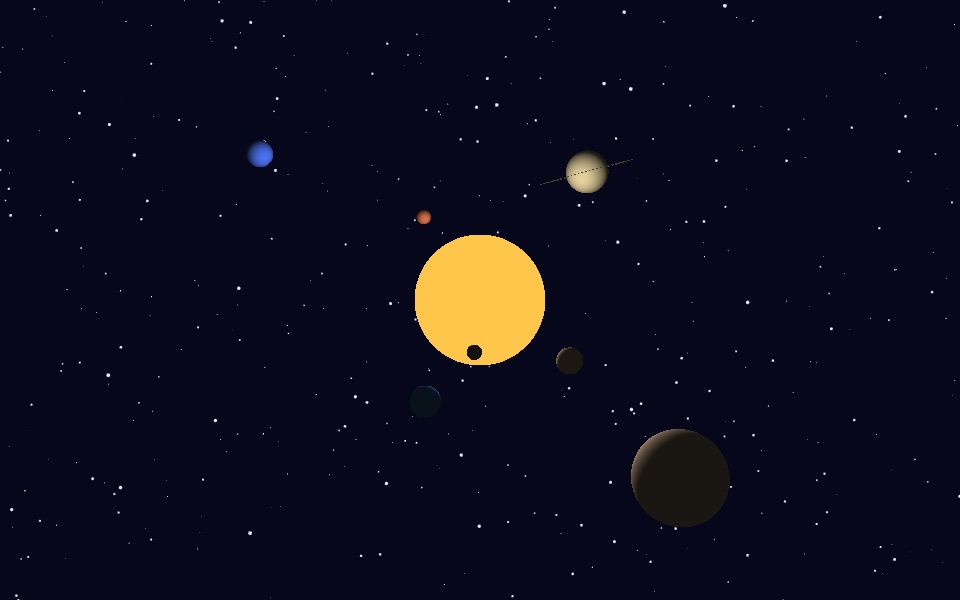
Flat colours, but look at Mercury in front of the sun. It's dark, because the lit side faces away from us. Nobody drew that shadow. It fell out of putting a light in the middle.
Then orbits: circles in space that become ellipses on screen, which is what makes your eye believe the depth. Then the real maps of each planet, from a free set that astronomy people use. A soft rim of atmosphere on the sunlit edge. A moon around Earth. And the click: press a planet and the camera flies there. The agent tested that one without a screen, by simulating a click at a coordinate and taking a picture afterwards.
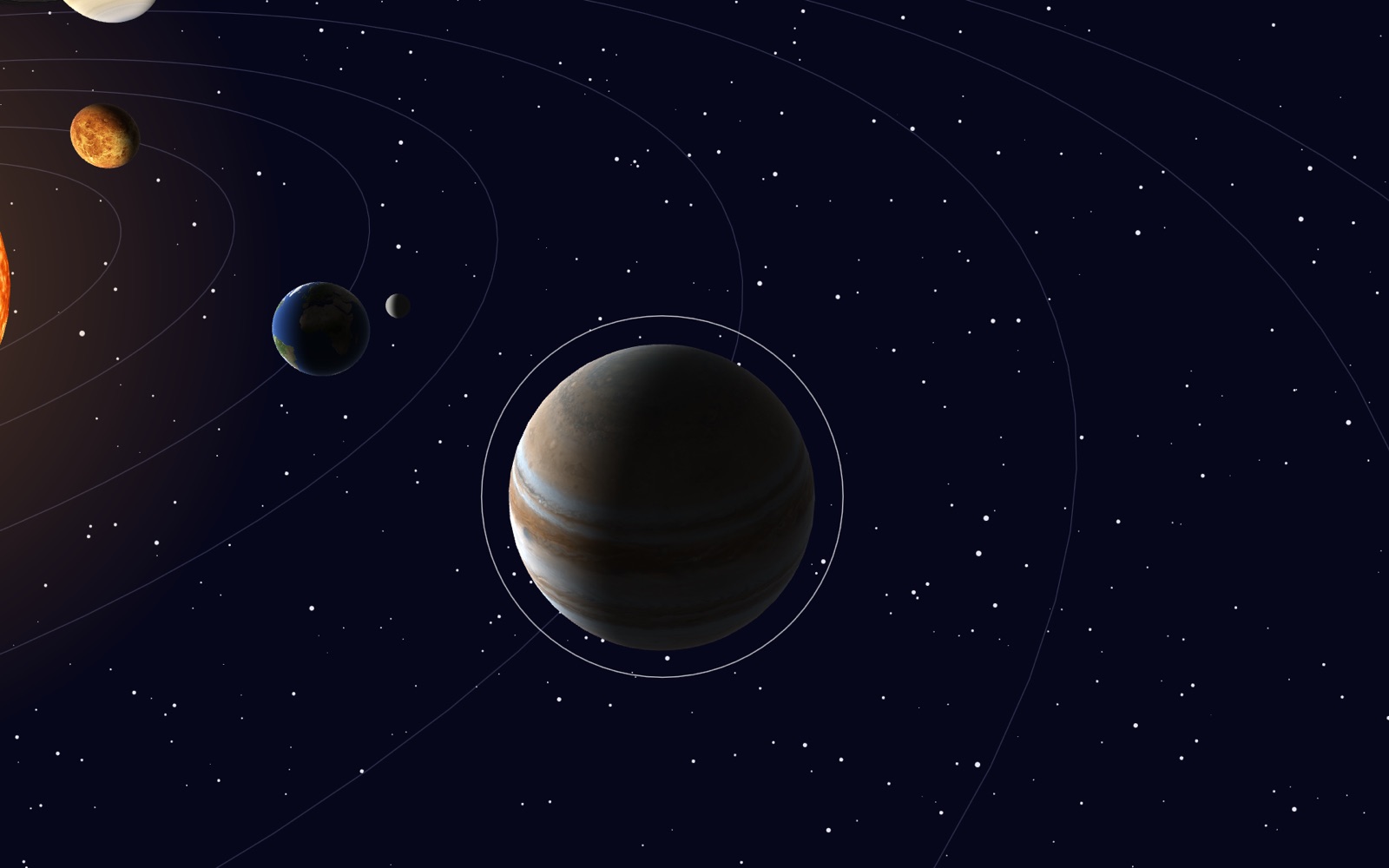
Twelve minutes for the solar system, twenty from installing the tool to the last picture. Twelve pictures sent to a phone. The editor opened zero times.
Rive Masterclass + Rive Scripting
Master Rive for real products.
Get Both for $219Both courses for $219. Save $49.

Rive Masterclass + Rive Scripting
Master Rive for real products.
Both courses for $219. Save $49.
What went wrong, in plain words
Plenty, and mostly in a good way.
Twelve times the agent wrote something the tool didn't accept, and twelve times the tool said exactly what it would accept instead. Each one was a single fix. This is a tool that complains early and precisely, and for an agent that's the best possible collaborator.
Three times, though, it failed quietly. The build said "fine" and the picture said otherwise, and those three cost more than all twelve loud errors together. If you work with an agent, that's the lesson: whatever the tool checks, look at the picture anyway.
Then I opened the editor
The next morning I signed in, the agent exported the editor file, and it appeared in my Rive. I pressed play. It ran. Planets, moon, orbits, the camera slowly circling. First try.
Then I went to the Data panel to change the camera angle, and nothing happened.
Small reason, quick fix: the connection between the script and its data hadn't survived the trip into the editor, and the agent rewired it in ten lines. After that the Data panel drove the scene live. And that was the moment I understood what I was actually looking at.
A finished thing
In the editor, this file is one artboard, one layout, one script. That's it. There is no Jupiter in the hierarchy. I cannot select a planet, nudge it, recolour it, put it on a timeline. The planets exist only inside the script's drawing, and the editor can't reach inside a script.
What the editor can do is turn the four knobs the script exposes: angle, tilt, zoom, speed. Data binding. A timeline can animate them, a button can set them, an app can drive them. But even those four knobs were the agent's decision, written in the text. If I want a fifth, I don't add it in the editor. I go back to the text.
So a scene like this is a finished thing. A component, not a document. And I want to be precise about why, because it's not the new tool's fault. It's what a script is. Every Node Script in the Scripting Course behaves exactly like this: pixels drawn by code, steered by inputs, nothing to grab with the mouse. What's new is that an agent can now build the whole scene that way, in twelve minutes, while you're out.
Rive's own guide for the tool says the quiet part out loud: use scripts as effects, don't let them take over the scene. Everything you author as regular Rive content, shapes, text, layouts, timelines, state machines, comes into the editor as regular Rive objects you can edit. I let the agent put everything in one script because I wanted real 3D, and real 3D lives on the GPU. The price is that my editor became a remote control.
The experiment that settled it
I wanted to check the opposite direction too. So the agent took the sun out of this scene and turned it into a small, self-contained script with two inputs, size and glow. Then it dropped that into a copy of the game the Scripting Course builds, in place of the sun I'd drawn by hand. Same position, same size, inside the same glows and rays I'd made myself. Only now it's a rotating, boiling ball of texture, and the size is one number I can bind, key or set.
That's the shape of it, I think. The agent builds the piece that needs code. You put it next to the pieces that need hands, bind its inputs to your data, key them on your timelines, ship. It's the same split the course has always taught. The agent just does more of the first half now, and doesn't need you in the room.
If you want to see for yourself, the whole thing is yours: the editor file, the exported .riv, and the text the agent wrote.
The Solar System Kit
The interactive solar system from the Rive CLI article: the editor file, the exported .riv, and the CLI project the agent wrote (scene, script, shader, planet maps). Open it in Rive, or run it yourself.
What this means if you're a designer
- Nothing about taste got automated. The agent built a correct solar system. Making it feel right (the tilt, the speed, the size of Jupiter, the glow) was a conversation, and every good decision in it came from a person looking at a picture and saying "not like that".
- Decide what stays editable before the agent starts. Regular Rive content stays yours in the editor. Script becomes a black box with knobs. Both are fine. Choosing by accident is not.
- Your job moves up a level. Less placing points, more saying what a thing should do and what it must never do. That's the skill the Scripting Course teaches, and this week it stopped being optional.
- And check the picture. Always the picture.
NEWIntermediate · 5 Sections · No coding required
Rive Scripting Course
Learn Rive scripting with AI by building a dynamic, space-based, game-like project.
Planet maps by Solar System Scope, CC BY 4.0.
Get more Rive tips
Weekly tutorials, new lessons, and Rive community highlights — no spam.